TOTAL CONTROL
Our flagship product. Akira JNI packs 60+ modules into a modern, fully customizable interface. Tune every feature, set your colors, move your HUD widgets wherever you want.
Players who want the complete package: every module, every customization option, wrapped in a polished modern interface. Friendly enough for newcomers, deep enough for veterans.
Dashboard
Live statistics and modules

System Status
All systems are operational. The cloud configuration engine is syncing in real-time with our secure servers to ensure maximum protection and performance.
*Status is updated in real-time based on telemetry data.
Modern UI
Polished interface with animations, rainbow modes, drag-and-drop HUD widgets, and live previews. Every visual detail tuned for clarity.
Destruct Protocol
One-click cleanup with optional fake app substitution. Double-press confirmation prevents accidents during heated gameplay.
System Benchmark
How Akira compares to the competition in real-world tests.
Win Every Fight.
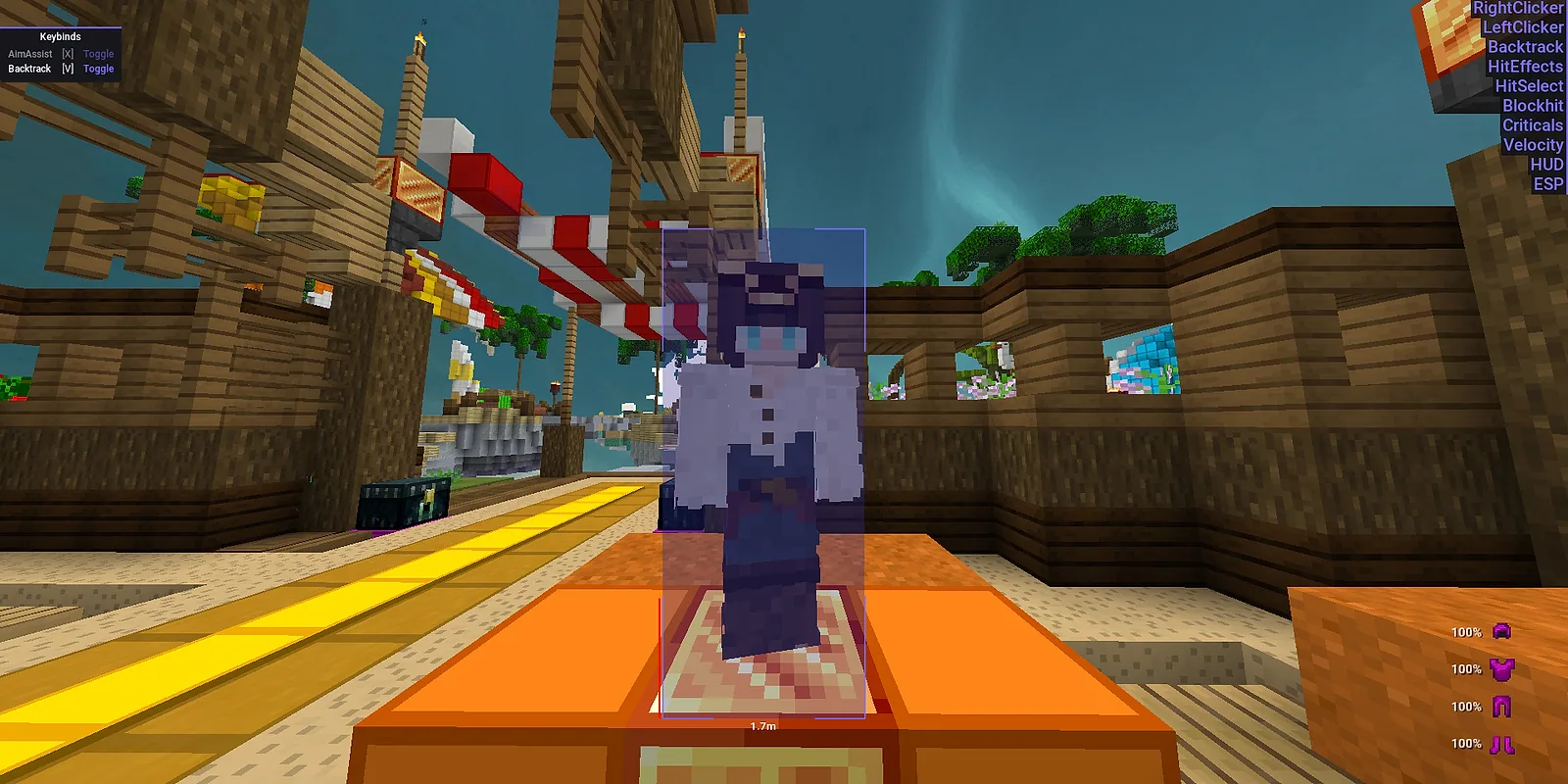
A full combat toolkit built to feel human. Aim Assist tracks your target with tunable smoothing, Backtrack rewinds their hitbox up to 200ms so late hits still land, and Reach extends your range — every value adjustable, nothing robotic.
- Aim Assist with Human-Like Smoothing & FOV
- Backtrack — Hit Rewound Hitbox Positions
- Extended Reach on Every Attack
- Fully Tunable — No Robotic Snap
Tune Everything.
Every module exposes its internals. Every slider, every color picker, every toggle is yours to adjust. 60+ modules, hundreds of settings. Build the exact client you want.
- 60+ Independent Modules
- Per-Module Keybinds & Hold/Toggle Modes
- Custom Colors on Every Visual Element
- Drag-and-Drop HUD Widgets
Interface That Impresses.
A fully animated, theme-aware UI designed to feel premium. Rainbow sync modes, smooth fade-slide transitions, category filters, and live previews on everything you tweak.
- Animated ArrayList with 4 Sort Modes
- Rainbow Modes: Sync, Wave, Gradient
- Fade & Slide Transitions
- Live Preview on All Settings
Play on Camera.
Dedicated StreamProof manager detects capture hooks and hides visuals from OBS, Discord streams, and screenshares in real-time. Stream to your audience without revealing a thing.
- Auto-Detects Capture Hooks
- Hides ESP, Chams, and HUD on Capture
- Full Visual Disable Option
- Works with OBS, Discord, ShareX
Module Selection
COMBAT
14 combat modules with humanization profiles, conditional activation, and per-module keybinds. Every value is tuneable.
Aim Assist
Smart aim correction with customizable FOV, smoothness, and humanization. Silent mode, horizontal/vertical split, target indicators.
Reach
Extended attack range (3.0-3.2 blocks) with hitbox expansion tuning, combo-mode per-target toggling, and auto-disable callbacks.
Velocity
Precise knockback reduction with chance-based activation, jump timing logic, and kite mode to maintain combat distance.
Criticals
Guaranteed critical hits with packet-based or timer-based modes. Chance-based application for natural variance.
Hit Select
Selective hit cancellation that skips wasted swings, high-hurt-resistance windows, and no-damage hits.
Blockhit
Automatic shield blocking with cooldown tracking, damage-take/give mode switching, and melee weapon whitelist.
Left Clicker
Fully configurable auto-clicker. CPS range, multi-click bursts, smart filtering, custom click sounds.
Right Clicker
Same depth as left clicker with only-block mode, smart filtering, and per-item blacklist.
TriggerBot
Automatic attack on entity detection with configurable reaction time (50-75ms) and aim-locked activation.
NoHitDelay
Removes combat cooldown between hits with tick-sync mechanics for clean back-to-back chains.
Randomization
Drop, spike, and exhaustion-based click patterns. Click location variance and fatigue simulation for natural output.
FakeLag
Server-side position desync with smart flush (auto-releases on water/falling), packet capping, and kite mode.
Backtrack
Rewind enemy positions for retroactive hits. Configurable delay, movement trail, smart auto-disable.
AutoRod
Smart PvP fishing rod automation with throw/retract/action timing and range-based activation (3-6 blocks).
Operator Briefing
Setup guides and feature demonstrations.
Coming Soon
Setup guides and feature walkthroughs are dropping soon. Want a heads-up or have a question? Reach out on our Discord.
Join our DiscordFootage incoming — join our Discord for the drop.
POWERFUL TOOLS.
FAIR PRICES.
No hidden fees, no surprises. Just raw performance built for the competitive edge.
User Transmission Logs

null_pointer
"Sixty-plus modules, every single one configurable down to the keybind. The module list alone is worth the price. Multi-version support is the cherry."

forge_user
"The HUD editor is the only one I've used that doesn't feel like fighting the UI. Drag, drop, snap, done. Rainbow ArrayList rendering at 240Hz, no jank."

KeystrokeOps
"Stream-proof rendering actually holds up. I screenshare in Discord daily and the destruct hotkey saves me when someone joins unannounced."

mc_modder
"Cloud config sync between my desktop and laptop is something I didn't know I needed. Set up once, every install pulls the same modules and binds."

polished_brass
"Animations and visuals are the most polished I've seen. The price is on the higher side but the build quality justifies it."
null_pointer
"Sixty-plus modules, every single one configurable down to the keybind. The module list alone is worth the price. Multi-version support is the cherry."
forge_user
"The HUD editor is the only one I've used that doesn't feel like fighting the UI. Drag, drop, snap, done. Rainbow ArrayList rendering at 240Hz, no jank."
KeystrokeOps
"Stream-proof rendering actually holds up. I screenshare in Discord daily and the destruct hotkey saves me when someone joins unannounced."
mc_modder
"Cloud config sync between my desktop and laptop is something I didn't know I needed. Set up once, every install pulls the same modules and binds."
polished_brass
"Animations and visuals are the most polished I've seen. The price is on the higher side but the build quality justifies it."
null_pointer
"Sixty-plus modules, every single one configurable down to the keybind. The module list alone is worth the price. Multi-version support is the cherry."
forge_user
"The HUD editor is the only one I've used that doesn't feel like fighting the UI. Drag, drop, snap, done. Rainbow ArrayList rendering at 240Hz, no jank."
KeystrokeOps
"Stream-proof rendering actually holds up. I screenshare in Discord daily and the destruct hotkey saves me when someone joins unannounced."
mc_modder
"Cloud config sync between my desktop and laptop is something I didn't know I needed. Set up once, every install pulls the same modules and binds."
polished_brass
"Animations and visuals are the most polished I've seen. The price is on the higher side but the build quality justifies it."
null_pointer
"Sixty-plus modules, every single one configurable down to the keybind. The module list alone is worth the price. Multi-version support is the cherry."
forge_user
"The HUD editor is the only one I've used that doesn't feel like fighting the UI. Drag, drop, snap, done. Rainbow ArrayList rendering at 240Hz, no jank."
KeystrokeOps
"Stream-proof rendering actually holds up. I screenshare in Discord daily and the destruct hotkey saves me when someone joins unannounced."
mc_modder
"Cloud config sync between my desktop and laptop is something I didn't know I needed. Set up once, every install pulls the same modules and binds."
polished_brass
"Animations and visuals are the most polished I've seen. The price is on the higher side but the build quality justifies it."
System FAQ
Akira JNI has never been detected. Our in-JVM injection method operates at a layer most anti-cheats don't inspect. Combined with StreamProof, FrameSpoof, and the Destruct protocol, you get multiple overlapping layers of protection.
Akira JNI supports Minecraft 1.7.10 and 1.8.9 across Vanilla, Forge, Lunar Client, and Feather Client. All running on Windows 10/11 with Java 8.
Run the Loader, authenticate, select your Minecraft client (Vanilla/Forge/Lunar/Feather), and launch your game. The client hooks into the JVM automatically on startup.
Yes. A dedicated StreamProof manager detects suspicious render hooks (used by OBS, Discord, ShareX) and hides all visuals from them automatically. You can also fully disable visuals with one keybind for extra safety.
The Destruct module scrubs evidence from your system. It cleans registry entries (including PCAC), disables modules, and can optionally substitute a fake innocent application to pass manual screenshares. Double-press confirmation prevents accidental triggers during gameplay.
Akira JNI has more modules than anything else we make: 60+ across combat, movement, visuals, and utilities. Every module gets its own keybind, every visual element gets its own color, and the HUD widgets are drag-and-drop. It's also the most polished interface we've shipped.
Every visual element supports custom colors. Every module has its own keybind with hold/toggle modes. HUD widgets are repositionable with anchor points. The ArrayList has 4 sort modes and 3 rainbow animation styles. You can spend hours just tuning the look before ever touching gameplay settings.