How Minecraft Anti-Cheats Detect Autoclickers: Intave, Polar and FairPlay
Intave, Polar and FairPlay don't just count CPS. Learn how anti-cheats read click timing, kurtosis and machine learning to detect Minecraft autoclickers.
Someone hits 16 CPS in a duel and the chat goes straight to “autoclicker.” Sometimes that’s right. Often it isn’t. Plenty of players butterfly or jitter click past 15 CPS by hand, and plenty of macros run at a calm 10.
That’s why modern anti-cheats barely care about your CPS number. They care about the shape of your clicking: the gaps between clicks, how much those gaps vary, whether patterns repeat, and whether your clicks line up with what’s happening in the fight.
Below we go through what a Minecraft server can actually see, the statistics anti-cheats run on your click timing, how Intave, Polar and FairPlay each handle it, and where machine learning fits in. Whether you play or run a server, you’ll know what’s really being measured.
Short answer: Minecraft anti-cheats detect autoclickers by analysing the timing between clicks, not just clicks per second. They look at interval consistency, variance, repeated patterns, outliers and distribution shape, then check that against combat context. Some, like FairPlay and Polar, add machine learning on top of these checks.
What can a Minecraft server actually see?
A server can’t see your hand or your mouse. It only sees the packets your client sends: swings, attacks, block interactions, and the time each one arrives.
That has two consequences:
- Everything is measured at arrival, not at the click. Network latency, frame pacing, mouse polling rate and client version all sit between your finger and the server’s clock.
- Every check is an inference. The anti-cheat is asking “does this stream of packets look like a human produced it?” It never gets to watch the human.
CPS limits: the simplest check
The oldest approach is a hard cap. Count clicks per second, flag anything over the limit.
Intave’s ClickSpeedLimiter works this way: it counts clicks against a global limit. Intave notes it’s quite accurate on 1.8 servers but can show small deviations on 1.9+ clients.
A cap is cheap and easy to explain, but it only answers one question: how fast? An autoclicker set to 11 CPS sails under any sensible limit. That’s why every serious anti-cheat goes further.
Click timing: intervals, variation and patterns
The real signal is in the intervals, the milliseconds between one click and the next.
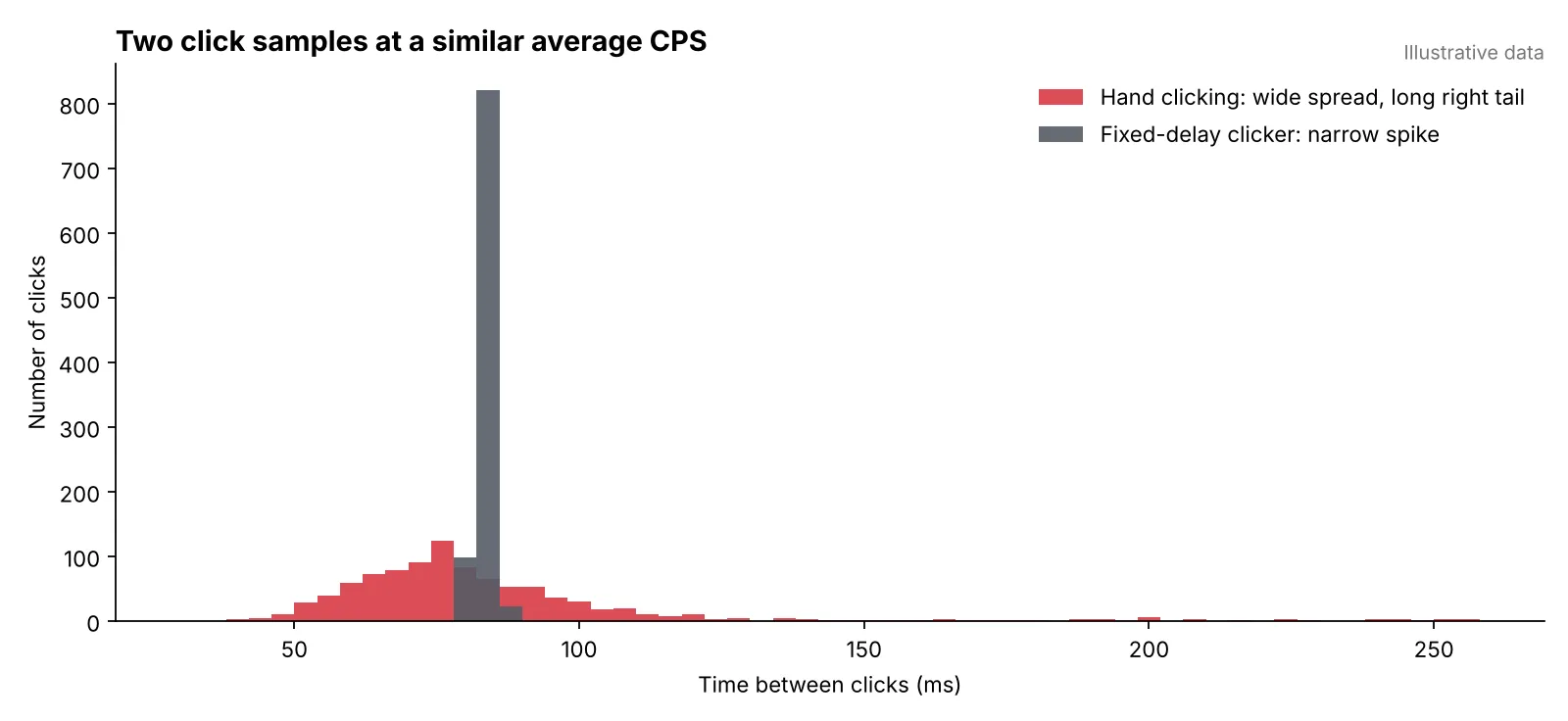
Both samples above average roughly 12 CPS. A CPS limit sees them as identical. An interval check does not.
Hand clicking produces a messy spread: fast bursts, slight hesitations, the occasional long pause when you reposition. A naive clicker produces a tight spike, because it fires on nearly the same delay every time.
The signals anti-cheats pull from that data usually include:
- Interval consistency: how tightly the gaps cluster.
- Variance and standard deviation: how much the gaps differ across a sample.
- Distinct delay counts: how many different interval values appear. Too few is suspicious.
- Repeated sequences: whether the same run of delays comes back across separate windows.
- Combat context: whether clicks line up with swings, hits and misses the way real fights do.
- Packet order: whether events arrive in a sequence a vanilla client would produce.
Sample size matters. Five clicks can look perfectly regular by chance. A good check waits for a longer window and compares like with like, because you click differently in a close-range trade than when you’re breaking a block.
Intave’s ClickPatterns check, added in Intave 14, looks for exactly these recurring timing patterns. Intave is upfront about its limits: the docs call it unstable, recommend using it for testing, and say they do not recommend banning players for its detections.
Outliers, skewness and kurtosis, explained
Once you treat clicks as a distribution instead of an average, three statistics come up again and again.
- Outliers are intervals far from the rest of the sample: a 40 ms double tap or a 250 ms pause. Humans produce them constantly. Their absence can be as telling as their presence.
- Skewness measures whether the distribution leans to one side. Human clicking usually has a longer tail on the slow side, because you can pause for any length of time but you can’t click infinitely fast.
- Kurtosis describes how heavy the tails are compared with a normal distribution, in other words how often extreme values show up relative to the centre. It doesn’t count outliers and it doesn’t flag a clicker by itself. It’s one descriptor among several.
No single statistic catches every clicker, and any one of them will misfire on some legitimate player. The checks become useful when several signals agree over a long enough sample.
Machine learning in autoclicker detection
The newer approach is to stop hand-tuning thresholds and let a model weigh all the signals together. A model takes a window of click features and outputs a confidence score.
FairPlay documents a dedicated autoclicker model alongside its interval checks. Polar markets machine learning models that analyse player behaviour in real time, running in the cloud.
We think this is the right direction for anti-cheat. A model can catch combinations of signals that no single threshold would. But a model is only as good as its training data, and it has to hold up across versions, ping and very different clicking styles. FairPlay’s own machine learning guide says the same: the model is one more confidence layer beside explicit checks, not a replacement for evidence.
How Intave, Polar and FairPlay handle it
Each of the big three takes its own route, and each publishes a different amount about it.
Intave
Intave splits click detection into two documented checks: ClickSpeedLimiter for raw speed and ClickPatterns for timing patterns. Thresholds and actions are set in its configuration, so two Intave servers can behave very differently.
Polar
Polar sends relevant player packets to the cloud for inspection and runs detections that don’t need real-time action there. Its site doesn’t single out autoclicker detection. What stands out is its response model: Polar applies mitigations, such as restricting a player’s combat abilities, while it’s still uncertain, and moves to punishment once it’s confident.
FairPlay
FairPlay publishes the most detail. Its autoclicker detection guide lists delay stability and skewness, distinct delay counts, phase locks, rounded-CPS artifacts, spike behaviour, hit/miss consistency, outlier structure and tick-aligned sequences. It also states plainly that no single CPS number carries the decision and that ML confidence alone shouldn’t trigger a ban.
Do anti-cheats build long-term click profiles?
A click profile would be a baseline of how you click (your typical intervals, variance and habits) that new samples get compared against.
Public documentation mostly describes session windows: a snapshot of behaviour from one stretch of play. None of Intave, Polar or FairPlay publicly documents a persistent, cross-session profile per player. Some private systems are rumoured to do it, but there’s no public technical detail to point to.
It’s also harder than it sounds. Your clicking changes with fatigue, a new mouse, pressure and the type of fight. A profile that doesn’t account for that would flag people for getting a new mouse.
What happens after a detection?
A flag doesn’t automatically mean a ban. Depending on the anti-cheat and the server’s config, the response might be:
- Cancelling hits or reducing damage
- Logging the event for staff
- Alerting online moderators
- Mitigating combat, as Polar does, before deciding
- Kicking or banning once violations stack up
Rules vary just as much as configs. Some servers allow autoclickers under a set CPS, others ban them outright. Two servers running the same anti-cheat can reach completely different outcomes, so a result on one tells you little about another.
How Akira Clicker is built around detection
There’s no setting that gets past every anti-cheat, and we’ve never pretended otherwise. That’s why we built Akira Clicker to let you configure and tweak pretty much everything about how you click, instead of handing you one preset and hoping for the best.
In v2.1 we added an interactive click pattern designer, so you can draw the rhythm you want as a graph right inside the app. Behind it, our logic makes sure no two identical values get sent within a window, so the repeated delays that interval checks hunt for never show up. Drops, Spikes and Exhaustion sit on top of that and add the slowdowns, bursts and tired stretches a real hand goes through in a fight. And before you send a single click in game, you can run a real-time simulation in the app and watch exactly how your pattern behaves.
If setting up randomization sounds like a lot, start with the Click Recorder. It isn’t your usual recorder: it hooks into Windows mouse processing to get the most accurate data possible and captures every state of your clicking pattern, so what plays back is genuinely you. You can save your recordings, share them with friends, and use them across all of our products, Akira JNI and Akira Memory included. Record once, use it in any Akira app.
One tip from us: record somewhere between 3,000 and 5,000 clicks. Some anti-cheats track 3,000 clicks or more, and a short recording loops sooner, which means repeating patterns. The more clicks you give it, the smaller the chance of getting flagged for repetition.
Akira Clicker is free, and you can grab it here.
The bottom line
Autoclicker detection stopped being about CPS a long time ago. It’s statistics on click timing, read in context, increasingly with machine learning on top. Intave, Polar and FairPlay each take a different route, and server configuration matters as much as the anti-cheat itself.
We at Akira wish the best of luck to anti-cheat developers. We’re waiting for the next generation of anti-cheats and hope to grow together with them along the way.
Glossary 15 terms
- CPS
- Clicks per second. How many times you click in one second. 10 CPS means a click roughly every 100 ms.
- Autoclicker
- Software that clicks for you, either at a fixed speed or with randomized timing.
- Anti-cheat
- A server plugin or service that watches player behaviour and flags anything that looks like cheating. Intave, Polar and FairPlay are examples.
- Machine learning
- Software that learns patterns from example data instead of following rules a developer wrote by hand.
- Packet
- A small message your Minecraft client sends to the server, like "I swung" or "I hit this player." The server only ever sees these, never your mouse.
- Latency
- How long data takes to travel between you and the server. You see it as your ping, in milliseconds.
- Frame pacing
- How evenly your game draws frames. Uneven frames can shift the moment your clicks get sent.
- Flag
- When an anti-cheat marks something as suspicious. A flag is a note for review, not a ban.
- Interval
- The time between two clicks, measured in milliseconds (ms). Anti-cheats study these gaps more than raw CPS.
- Distribution
- The full spread of your click intervals: which gaps happen often, which are rare, and how far apart they range.
- Normal distribution
- The classic bell curve. Most values sit near the middle and extreme values get rarer the further out you go.
- Confidence score
- A model's estimate of how sure it is, for example 0.92 that a click sample came from software.
- Mitigation
- A soft penalty, like reduced reach or damage, applied while the anti-cheat is still deciding.
- Tick
- One step of the Minecraft game clock. Servers run 20 ticks per second, so one tick is 50 ms.
- Session window
- A stretch of recent play that the anti-cheat analyses as one sample.